
OEMNAVIGATIONS
NBT EVO ID5/6 Native Wireless Android Auto Activation - DIY for BMW, Mini & Rolls-Royce
NBT EVO ID5/6 Native Wireless Android Auto Activation - DIY for BMW, Mini & Rolls-Royce
Couldn't load pickup availability
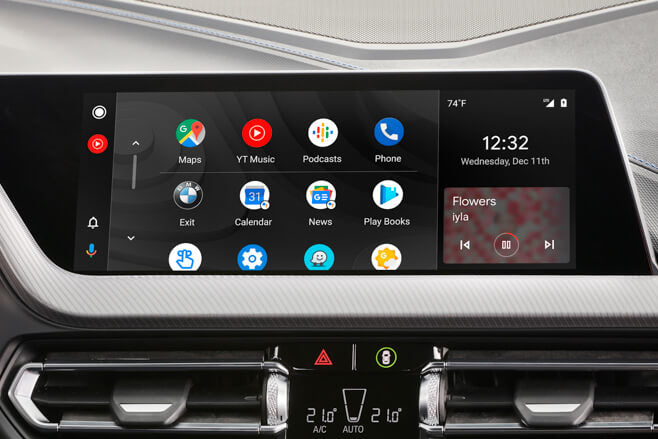
Android Auto on your factory iDrive screen. No MMI box. No remote session.
BMW never gave NBT EVO ID5/ID6 Android Auto. Now you can add it — natively, inside the original head unit, wirelessly or over a USB cable. Developed in-house by the OEMNAVIGATIONS team and installed by you, at home, with an ENET cable and a laptop.
Key features
- Native integration — runs inside the factory NBT EVO head unit, part of iDrive
- Wireless or wired — the phone connects automatically over WiFi, or you plug it in with a USB cable. You choose in the iDrive menu
- No extra hardware — no MMI box, no AUX, no screen replacement
- Factory controls — iDrive controller, touchscreen and steering wheel buttons
- Factory audio — sound through the car's own audio system
- Full-screen apps — Google Maps, Waze, Spotify, YouTube Music, WhatsApp, calls, Google Assistant
- DIY installation — no booking, no remote technician, do it on your schedule
- Keeps factory functions — BMW navigation, radio, DAB and Apple CarPlay stay as they are
How installation works
- Order and enter your VIN.
- We check your VIN and email your activation code.
- Connect your laptop to the car's OBD port with an ENET cable.
- Run our DIY installer app, enter your code and follow the on-screen steps.
- Pair your Android phone — Android Auto is ready to use.
What you need
- ENET (OBD-to-Ethernet) cable — any standard ENET cable
- Laptop running Windows (10 or 11)
- Android phone — Android 11 or newer for the wireless connection
- A WiFi antenna fitted to the head unit — only for the wireless connection. No antenna? Use a USB cable instead
Compatibility
Works with original BMW NBT EVO ID5 and ID6 head units. Compatibility depends on the installed head unit, not on the model or year — always check your VIN before buying.
| Brand | Chassis |
|---|---|
| BMW 1 / 2 Series | F20, F21, F22, F23, F87 M2 |
| BMW 3 / 4 Series | F30, F31, F34, F80 M3, F32, F33, F36, F82/F83 M4 |
| BMW 5 / 6 / 7 Series | G30, G31, G32 GT, F06, F12, F13, G11, G12 |
| BMW X Series | F48 X1, F39 X2, F25 X3, F26 X4, G01 X3, G02 X4, F15 X5, F16 X6, F85/F86 M |
| BMW i | i3, i8 |
| MINI | F54 Clubman, F55, F56, F57, F60 Countryman |
| Rolls-Royce | Models fitted with NBT EVO ID5/ID6 |
No WiFi antenna? Use a USB cable. Wireless Android Auto uses the head unit's WiFi antenna, so an NBT EVO ID5/ID6 without one cannot connect wirelessly. You do not have to take the unit out of the dash to fit an antenna — switch the connection type to USB in the iDrive menu and connect your phone with a cable.
Not compatible: CIC, NBT (non-EVO), NBT EVO ID4, ENTRYNAV2, iDrive 7/8, and any third-party or aftermarket head unit. Original BMW NBT EVO ID5/ID6 only.
Why OEMNAVIGATIONS
- Developed in-house — our own software, not a resold solution
- Built and tested on real cars — across multiple head units and software versions before launch
How this compares to other NBT EVO Android Auto solutions
We tested several NBT EVO Android Auto solutions from other developers and sellers. This is what we found, next to what ours does.
| OEMNAVIGATIONS | Other versions |
|---|---|
| The car's firewall stays on — Android Auto connects without opening up the head unit or changing BMW's network rules. | The firewall is switched off to get the phone connected. The head unit is then wide open on the car's network, and the built-in modem's internet stops. |
| ConnectedDrive, RTTI and weather keep working — live traffic, online search and the other BMW services run exactly as before, alongside Android Auto. | With the firewall off these services go dead: no live traffic information, no online services, and usually no explanation. |
| No system files touched — nothing in iDrive is modified or written, so an install or an update cannot damage it. | The system partition is remounted and system files are changed. A power cut or one wrong file during that can leave the head unit unable to boot. |
| Waze directions and speed camera alerts over any source — you hear every turn and every camera warning on FM radio too. The radio dips for the announcement and comes back after it. | Announcements go through the phone's Bluetooth audio only. With the radio on you hear nothing: missed turns and missed speed camera warnings. |
| Uncompressed 48 kHz / 16-bit audio over WiFi — full-quality sound straight from the phone, with Bluetooth in the menu if you prefer it. | Bluetooth only: compressed sound, and every Bluetooth hiccup is heard in the music. |
| Its own settings menu in iDrive — switch Android Auto on or off, choose a wireless or USB connection, pick WiFi or Bluetooth audio, set the volumes and the start screen, all with the iDrive controller. | Settings need a laptop and command-line edits, or there are no settings at all. |
| One-click install, every step verified — our Windows app checks each step and rolls back to the previous state if anything goes wrong. | Manual installation over a command line, with root passwords and system changes. One typo can break the head unit, and every update means doing it all again. |
Read the full comparison — all 16 points
FAQ
Is this real Android Auto or screen mirroring?
Real Android Auto, the same interface you get in newer cars.
Do I need an MMI box?
No. Everything runs in the factory head unit.
Is it wireless?
Yes, and wired as well. The phone connects automatically over WiFi, or you can plug it in with a USB cable — you choose the connection type in the iDrive menu.
Can I install it without coding experience?
Yes. The installer guides you through every step.
Do I need a Windows PC?
Yes. The installer runs on Windows (10 or 11), and you connect the laptop to the car with an ENET cable.
Does it work on MINI and Rolls-Royce?
Yes, if the car has NBT EVO ID5/ID6.
What if my car has NBT EVO ID4?
ID4 units are not compatible with this activation.
Do I need a WiFi antenna?
Only for the wireless connection. If the head unit has no antenna, you do not need to take it out to fit one — select USB in the iDrive menu and use a cable.